
Today, we are releasing version 5 of @adonisjs/inertia with complete support for Inertia v3.
We have rebuilt the official adapter around the latest Inertia protocol and client releases, and layered on the thing AdonisJS is best at, ie, types that flow from your routes, validators, transformers, and middleware all the way into your React or Vue components.
Upgrading to @adonisjs/inertia v5
Version 5 is made for
Inertia v3
and the new @adonisjs/vite integration, so you should upgrade these packages together.
Upgrade the dependencies
For React applications, upgrade Inertia, React, Vite, and their respective plugins using the following commands.
npm install @adonisjs/inertia@5 @adonisjs/vite@6 @inertiajs/core@3 @inertiajs/react@3 react@19 react-dom@19
npm install --save-dev vite@8 @vitejs/plugin-react@6
For Vue applications, use Vue 3.5 and version 6 of the Vite Vue plugin.
npm install @adonisjs/inertia@5 @adonisjs/vite@6 @inertiajs/core@3 @inertiajs/vue3@3 vue@^3.5 @vue/server-renderer@^3.5
npm install --save-dev vite@8 @vitejs/plugin-vue@6
Update the Vite config
The old Inertia Vite plugin was responsible for compiling the SSR entrypoint. This work now belongs to @adonisjs/vite, alongside the rest of your frontend build.
Remove the @adonisjs/inertia/vite import and the inertia() plugin from your vite.config.ts file. Also, rename entrypoints to entryPoints. If you use SSR, register the SSR entrypoint using serverEntryPoints.
import { defineConfig } from 'vite'
import react from '@vitejs/plugin-react'
import adonisjs from '@adonisjs/vite/client'
import inertia from '@adonisjs/inertia/vite'

export default defineConfig({
  plugins: [
    react(),
    inertia({ ssr: { enabled: true, entrypoint: 'inertia/ssr.tsx' } }),
    adonisjs({
      entrypoints: ['inertia/app.tsx'],
      reload: ['resources/views/**/*.edge'],
    }),
    adonisjs({
      entryPoints: ['inertia/app.tsx'],
      serverEntryPoints: ['inertia/ssr.tsx'],
      reload: ['resources/views/**/*.edge'],
    }),
  ],
})
The Vue config is identical except for the Vue plugin and the .ts entrypoint names. You may omit serverEntryPoints when SSR is disabled.
Clean up the Inertia config
If your config/inertia.ts file has an ssr.bundle property, remove it. Vite now decides where the server bundle is written. The Inertia config only needs to know whether SSR is enabled and which module it should load.
import { defineConfig } from '@adonisjs/inertia'

const inertiaConfig = defineConfig({
  ssr: {
    enabled: true,
    bundle: 'ssr/ssr.js',
    entrypoint: 'inertia/ssr.tsx',
  },
})

export default inertiaConfig
Inertia v3 also uses the data-inertia attribute for elements managed inside the document head. Update the fallback title in your root template.
<title inertia>AdonisJS</title>
<title data-inertia>AdonisJS</title>
Move flash messages out of shared props
Version 5 gives flash messages their own field on the Inertia page object. If your middleware currently returns a flash object from share(), move it to the new flash() method. Keep validation errors and all other shared data inside share().
import type { HttpContext } from '@adonisjs/core/http'
import type { NextFn } from '@adonisjs/core/types/http'
import type { InferSharedProps } from '@adonisjs/inertia/types'
import BaseInertiaMiddleware from '@adonisjs/inertia/inertia_middleware'

export default class InertiaMiddleware extends BaseInertiaMiddleware {
  share(ctx: HttpContext) {
    const { session } = ctx as Partial<HttpContext>

    return {
      errors: ctx.inertia.always(this.getValidationErrors(ctx)),
      flash: ctx.inertia.always({
        success: session?.flashMessages.get('success') as string | undefined,
        error: session?.flashMessages.get('error') as string | undefined,
      }),
    }
  }

  flash(ctx: HttpContext) {
    const { session } = ctx as Partial<HttpContext>

    return {
      success: session?.flashMessages.get('success') as string | undefined,
      error: session?.flashMessages.get('error') as string | undefined,
    }
  }

  async handle(ctx: HttpContext, next: NextFn) {
    await this.init(ctx)
    const output = await next()
    this.dispose(ctx)
    return output
  }
}

declare module '@adonisjs/inertia/types' {
  type MiddlewareSharedProps = InferSharedProps<InertiaMiddleware>
  export interface SharedProps extends MiddlewareSharedProps {}
}
Update the frontend type bridge
Connect the middleware types to Inertia's client types inside the inertia/types.ts file.
import type { Data } from '@generated/data'
import type { PropsWithChildren } from 'react'
import type { JSONDataTypes } from '@adonisjs/core/types/transformers'
import type { InferFlashData } from '@adonisjs/inertia/types'
import type InertiaMiddleware from '#middleware/inertia_middleware'

export type InertiaProps<T extends JSONDataTypes = {}> = PropsWithChildren<
  Data.SharedProps & T
>

declare module '@inertiajs/core' {
  interface InertiaConfig {
    sharedPageProps: Data.SharedProps
    flashDataType: InferFlashData<InertiaMiddleware>
  }
}
// insert-end
Apply the Inertia v3 frontend changes
The remaining breaking changes live in your React or Vue code. Inertia v3 renamed the invalid and exception events, replaced router.cancel() with router.cancelAll(), removed the old progress exports, and requires arrow functions for persistent layouts.
Follow the official Inertia v3 upgrade guide to apply these changes. Also, install Axios directly if your application imported the copy that used to be bundled with Inertia.
Verify the upgrade
Run the type checker and create a production build. The production build is important because it verifies the new client and SSR entrypoints together.
npm run typecheck
npm run build
Instant visits
A regular Inertia visit waits for the server response before rendering the next page. Most of the time this is exactly what you want. But sometimes, the current page already has enough information to render a useful version of the destination.
Imagine a projects listing where every card has a title, description, status, and progress. When someone opens a project, you can render the details page immediately with this data and let the server fill in the remaining information in the background.
Pass the destination component and its temporary props to the Link component.
import { Link } from '@adonisjs/inertia/react'
import type { Data } from '@generated/data'

export function ProjectCard({ project }: { project: Data.Project }) {
  return (
    <Link
      route="projects.show"
      routeParams={{ slug: project.slug }}
      component="projects/show"
      pageProps={() => ({ project, isPreview: true })}
    >
      Open project
    </Link>
  )
}
The original request still goes to the server. When the response arrives, Inertia replaces the preview props with the real response. Since the controller does not return isPreview, the preview state disappears automatically.
The destination is type-safe as well. The route limits component to the pages rendered by that route, and pageProps must satisfy the props expected by the selected page.
Optimistic updates
Optimistic updates are useful for small interactions where waiting for the server makes the interface feel unnecessarily slow. Checklists, toggles, likes, and sorting controls are good examples.
The optimistic callback updates the current page props immediately. Inertia keeps a snapshot of the previous props and restores it when the request fails, so you do not have to maintain a second copy of the same state with useState.
import { Form } from '@adonisjs/inertia/react'
import type { Data } from '@generated/data'

type ChecklistItemProps = {
  task: Data.LaunchTask
  tasks: Data.LaunchTask[]
}

export function ChecklistItem({ task, tasks }: ChecklistItemProps) {
  return (
    <Form
      route="tasks.toggle"
      routeParams={{ id: task.id }}
      optimistic={() => ({
        tasks: tasks.map((currentTask) =>
          currentTask.id === task.id
            ? { ...currentTask, completed: !currentTask.completed }
            : currentTask
        ),
      })}
      options={{ preserveScroll: true }}
    >
      <button type="submit">Toggle task</button>
    </Form>
  )
}
Your controller remains ordinary. It performs the update and redirects back to the page with the latest data. On success, the server response becomes the source of truth. On failure, Inertia rolls the optimistic change back.
Once props
Some data is needed throughout an application but rarely changes. Country names, calling codes, currencies, and feature flags are common examples. Sending this data with every response wastes time twice. The server recomputes it, and the browser downloads it again.
Wrap such values with inertia.once(). The server resolves the prop on the first visit. On later visits, the browser tells the server which once props it already has, allowing the server to skip both the computation and the response payload.
return inertia.render('countries/index', {
  selectedRegion: request.input('region', 'All'),

  countries: inertia.once(async () => {
    const countries = await Country.all()
    return CountryTransformer.transform(countries)
  }),
})
Once props stay cached for the browser session by default. You can set an expiry, share the same value across multiple pages with a cache key, or explicitly request a fresh value when the underlying data changes.
countries: inertia.once(loadCountries, {
  key: 'country-directory',
  expiresIn: '30m',
})
Type-safe forms and validation errors
The Form component included with @adonisjs/inertia understands named AdonisJS routes. Point it at a route and the callback APIs are inferred from the VineJS validator used by that route.
import { Form } from '@adonisjs/inertia/react'

export default function CreateSupportRequest() {
  return (
    <Form route="support_requests.store">
      {({ errors, clearErrors, processing }) => (
        <>
          <input
            name="email"
            type="email"
            /** Type-safe clearErrors */
            onChange={() => clearErrors('email')}
          />

          {/* Type-safe errors object */}
          {errors.email && <p>{errors.email}</p>}

          <button type="submit" disabled={processing}>
            Send request
          </button>
        </>
      )}
    </Form>
  )
}
In this example, errors.email, clearErrors('email'), reset fields, and the transform callback all use the route's request body type. A typo in any of these places is a compile-time error.
The name attribute on a native HTML input remains a regular string. TypeScript cannot inspect arbitrary JSX children and relate them back to the parent Form component.
Error bags use the same typed errors while keeping multiple forms on a page isolated from one another.
<Form route="members.invite" errorBag="inviteMember">
  {({ errors }) => <>{errors.email && <p>{errors.email}</p>}</>}
</Form>
Type-safe HTTP requests with useHttp
Not every interaction should perform an Inertia visit. Autocomplete, checking a coupon code, or interacting with a 3rd party API needs a JSON request while the current page stays mounted.
Inertia v3 introduces useHttp for these requests. The AdonisJS wrapper binds the hook to a named route, so you specify the route only once and receive its request body, successful response, and validation errors automatically.
import { useHttp } from '@adonisjs/inertia/react'

export function useShipmentTracking() {
  const request = useHttp(
    { route: 'tracking.show' },
    { trackingNumber: '' }
  )

  async function lookup() {
    await request.submit()
  }

  return { request, lookup }
}
The body is inferred from the route's VineJS validator. The response is inferred from the controller return value, including the browser-facing values produced by transformers.
return serialize({
  shipment: ShipmentTransformer.transform(shipment),
})
First-class flash messages
Flash messages used to masquerade as shared props. This worked, but it also meant they were stored alongside the rest of the page props in browser history. A "Post created" toast could reappear when the user navigated back to an older page.
Version 5 gives flash messages their own field on the page object. Define their shape once using the middleware's flash() method, write messages to the session as usual, and read them from usePage().flash.
session.flash('success', 'Post created')
return response.redirect().toRoute('posts.index')
import { useEffect } from 'react'
import { toast } from 'sonner'
import { usePage } from '@inertiajs/react'
export function FlashToasts() {
const { flash } = usePage()
useEffect(() => {
if (flash.success) {
toast.success(flash.success)
}
}, [flash.success])
return null
}Flash data is stripped from history state, so old notifications do not replay. You can also create a client-only flash message with router.flash() when no server request is needed.
router.flash(() => ({
  info: 'Preview only. Nothing was published.',
}))
View transitions
Inertia v3 can wrap a visit inside the browser's View Transition API. Start by adding viewTransition to a link or a router visit.
import { Link } from '@adonisjs/inertia/react'
import type { Data } from '@generated/data'

export function PosterCard({ poster }: { poster: Data.Poster }) {
  return (
    <Link
      route="posters.show"
      routeParams={{ slug: poster.slug }}
      viewTransition
    >
      Open poster
    </Link>
  )
}
For a shared-element transition, give the corresponding element on both pages the same view-transition-name. The browser will animate between their old and new positions.
import type { Data } from '@generated/data'

export function PosterArtwork({ poster }: { poster: Data.Poster }) {
  return <div style={{ viewTransitionName: `poster-${poster.slug}` }}>
    {poster.title}
  </div>
}
The browser provides a sensible default animation. You can change its duration and easing with CSS, while respecting the user's reduced-motion preference.
::view-transition-group(poster-afterglow) {
  animation-duration: 620ms;
  animation-timing-function: cubic-bezier(0.22, 1, 0.36, 1);
}

@media (prefers-reduced-motion: reduce) {
  ::view-transition-group(*) {
    animation-duration: 0.01ms !important;
  }
}
Deferred props that fail gracefully
Deferred props keep slow work out of the initial response. They are perfect for analytics, recommendations, and data coming from external services. But external services fail, and a secondary dashboard card should not take down the entire page.
Mark a deferred prop as rescuable by passing the rescue option.
return inertia.render('dashboard/index', {
  insights: inertia.defer(
    async () => {
      const insights = await fetchInsights()
      return BriefingTransformer.transform(insights)
    },
    { rescue: true }
  ),
})
The Deferred component can render loading, success, and rescued states. Keep the surrounding card mounted and replace its contents, so a retry does not make the whole layout jump.
<aside className="panel">
  <Deferred
    data="insights"
    fallback={<InsightsLoading />}
    rescue={({ reloading }) => <InsightsError retrying={reloading} onRetry={retryInsights} />}
  >
    {insights && <InsightsList insights={insights} />}
  </Deferred>
</aside>
Retry only the failed prop with a partial reload. router.reload() preserves the current scroll position automatically.
function retryInsights() {
  router.reload({ only: ['insights'] })
}
Rescued exceptions are logged by default. You can register Inertia.onRescue() when you also want to report them to an external monitoring service.
Selective SSR with a client-side fallback
Not every page in an application benefits from server-side rendering. Public marketing and content pages often need the initial HTML for search engines, while an authenticated dashboard can remain entirely client-rendered.
You can enable SSR globally and use the pages option to decide which pages should be rendered on the server.
import { defineConfig } from '@adonisjs/inertia'

export default defineConfig({
  ssr: {
    enabled: true,
    entrypoint: 'inertia/ssr.tsx',
    pages: (_ctx, page) => page.startsWith('marketing/'),
  },
})
Pages that match the callback are server-rendered. Every other page falls back to the usual client-side Inertia boot process. This keeps SSR focused on the pages where it has a measurable benefit.
Infinite scroll in both directions
The inertia.scroll() helper connects an AdonisJS paginator to Inertia's InfiniteScroll component. The initial page can be anywhere in the result set, allowing the component to prepend newer records while scrolling up and append older records while scrolling down.
return inertia.render('activities/index', {
  activities: inertia
    .scroll(async () => {
      const page = request.input('page', 3)
      const paginator = await Activity.query().paginate(page, 10)

      return ActivityTransformer.paginate(
        paginator.all(),
        paginator.getMeta()
      )
    })
    .matchOn('id'),
})
Render the paginated data inside the InfiniteScroll component. It observes the boundaries and issues partial reloads as they enter the viewport.
import { InfiniteScroll } from '@inertiajs/react'

export function ActivityFeed({ activities }: ActivityFeedProps) {
  return (
    <InfiniteScroll data="activities">
      {activities.data.map((activity) => (
        <ActivityItem key={activity.id} activity={activity} />
      ))}
    </InfiniteScroll>
  )
}
Inertia preserves the visible record when it prepends another page and updates the page query string as the user moves through the list. The matchOn key is inferred from the transformed activity type, so matchOn('idd') is a compile-time error.
InfiniteScroll does not virtualize the list or remove old elements from the DOM. For an unbounded feed, pair it with a separate virtualization or bounded-window strategy.
State of end-to-end type-safety
Type-safety in an Inertia application is best understood as one connected graph rather than a collection of typed helpers.
The root of the graph is the route definition. Routes enumerate every call the server accepts, so a frontend call to a route that does not exist, or with the wrong parameters, fails to compile. From that root, each server-side definition contributes its slice of the contract. The VineJS validator defines the request body and the validation error keys. The controller and its transformers define the values that cross the network. The Inertia middleware contributes shared props and flash data.
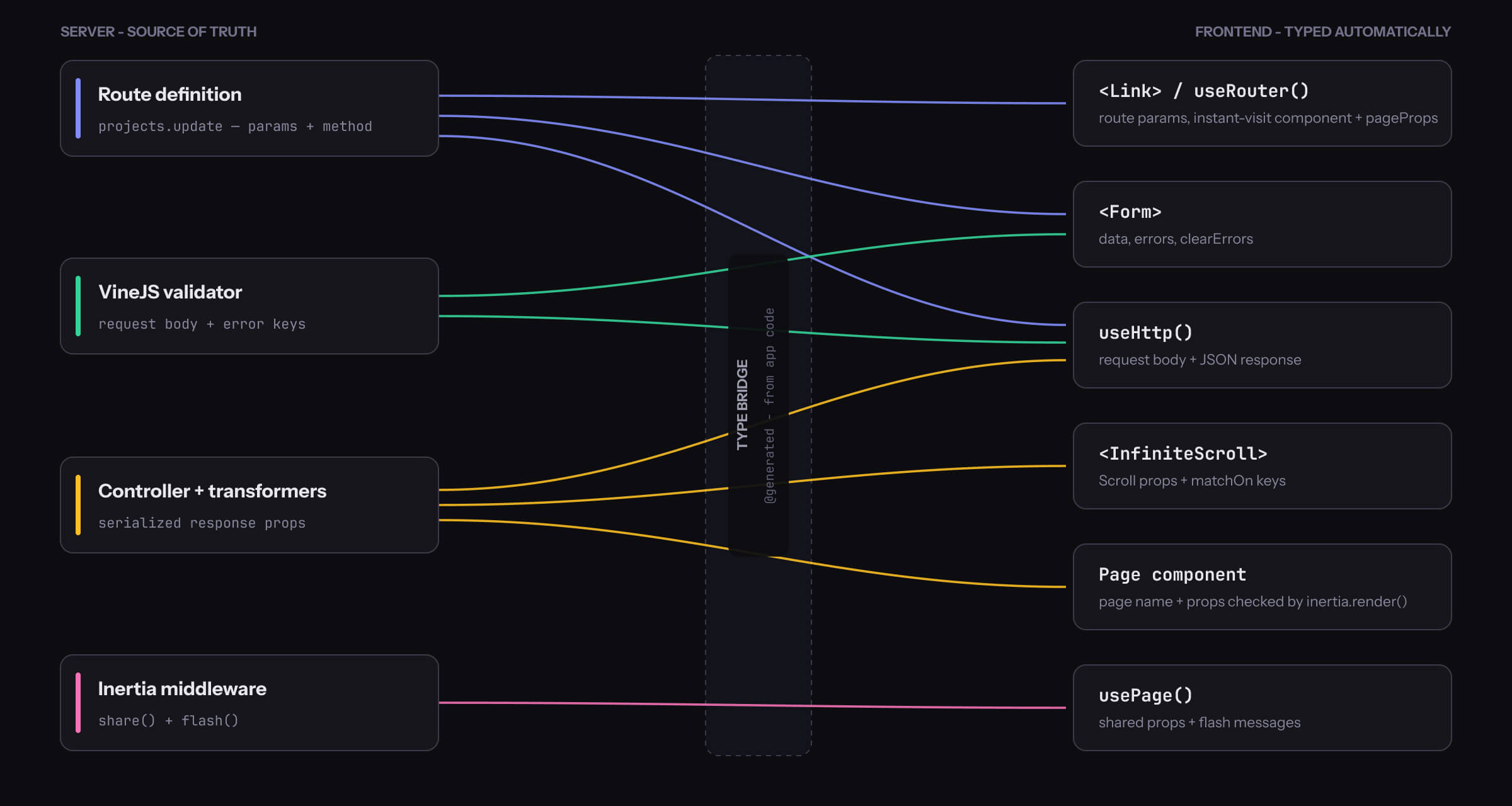
Every edge in this graph is a contract that TypeScript enforces, including the features that usually become weakly typed at their edges.
Formcombines the route's method with the validator's request body.useHttpcarries the complete contract of a single route, from its parameters to the serialized response.- Instant visit props are checked against the destination page.
- An infinite-scroll
matchOnkey must exist on the transformed data.
The type bridge in the middle is generated from the application code, so there is no hand-maintained schema waiting to drift out of sync.
You notice the value of this graph when the application changes. Rename a route parameter, validator field, transformer property, shared prop, flash key, or page component, and TypeScript points to every affected server render, frontend interaction, and test.
Give it a try
If you are starting a new application, use the updated React or Vue starter kit. For an existing AdonisJS 7 application, follow the upgrade steps above and read through the Inertia documentation for the complete API.
-
Upgrading to
@adonisjs/inertiav5 - Instant visits
- Optimistic updates
- Once props
- Type-safe forms and validation errors
-
Type-safe HTTP requests with
useHttp - First-class flash messages
- View transitions
- Deferred props that fail gracefully
- Selective SSR with a client-side fallback
- Infinite scroll in both directions
- State of end-to-end type-safety
- Give it a try